


Al Jazeera - الجزيرة
4.81.75K Reviews
App Specs
- Version
- 10.10.0
- Updated On
- License
- Free
- Downloads
- 1,000,000+
- Developer
- Al Jazeera Network
- Categories
- News & Magazines
- Platform
- Android, iOS
Screenshots






 Analysis by AppCompare
On a shared phone at home, a news app can become part of several people’s routines: one person checks headlines over breakfast, another follows a developing story later, and someone else wants a live broadcast in the evening. I find Al Jazeera - الجزيرة most useful in that setting when each person treats it as a source to consult, rather than assuming one person’s reading habits should define everyone’s news feed. Its mix of headlines, articles, video and live coverage gives a household more than one way to catch up, but a shared screen still calls for a little thought about whose preferences and alerts are in use.
A shared screen needs a simple routine
A realistic use might be a quick scan of the day’s headlines before work, followed by a longer read during lunch and a live news check at home. The app can serve those different moments without requiring everyone to use it in the same way: one reader can browse the homepage, while another can use My Topics to make a more focused pass through subjects they care about. For a family or housemates, that makes it easier to share a device without turning every session into a full catch-up on someone else’s interests.
I would still agree on a basic handoff routine if the phone or tablet is common property. A person who changes topic preferences or alert settings may affect what the next reader sees, so it helps to avoid treating those choices as private profiles. If everyone wants a distinct selection of subjects, separate devices or each person’s own app setup may be more comfortable than constantly changing one shared installation.
Set expectations before switching on alerts
Notifications can make a news app feel timely, but on a household device they also reach whoever happens to be nearby. Before enabling alerts, I’d decide whether breaking updates are genuinely useful to everyone who uses that screen. If not, a quieter setup is the more considerate choice; readers can open the app when they want an update instead of letting one person’s news interests interrupt the whole room.
The same boundary applies to My Topics. It is a useful way to make browsing more relevant, but a tailored feed can narrow what a shared-device reader encounters if it reflects only one person’s priorities. I’d keep the homepage and Trending in the regular routine too, so personalization acts as a shortcut rather than a complete substitute for looking beyond familiar subjects.
Useful for coordinating a conversation, not a household account system
When a major story comes up in conversation, having headlines, analysis and live coverage in the same app gives people a practical starting point. One person can share what they have read in person, while another can check the broadcast or explore a related topic. That is handy when a household wants to follow an event together without relying on a single format or waiting for a scheduled news program.
I would not treat a shared installation as a coordination tool that automatically keeps each person’s reading separate. The sensible approach is to decide who adjusts preferences and alerts, and to remember that different readers may want different levels of detail. For a quick group catch-up, the broad news view is probably the better common ground; topic customization is best when one person is using the device for their own session.
Worth Reading Before You Choose

EA SPORTS FC Mobile 26 Is a Bigger Football Game, but It Takes Time

Flipboard Shows What News Apps Must Do Beyond the Feed

Switching to Android Auto Means Rethinking Your Driving Routine

Google Calendar Makes a Crowded Week Easier to Manage

Ludo King Makes the Most of the Minutes Between Plans

Baby Panda World Brings Quick Play to Modern Phones, but Its Game Library Feels Busy
Age, trust and the kind of news experience
The app is rated Everyone 10+, so I would not assume that every story or live segment is meant for very young children simply because the app is available to a household. News can involve difficult subjects, and adults should use their judgment about when younger family members are watching or reading. The age label is a useful point of reference, not a replacement for deciding what is suitable in a particular home.
Al Jazeera Network develops the app, which centers the experience on its own reporting and presentation. That focus can be valuable if you want to follow its coverage in one place, but it is also a reason to compare major stories with other reputable outlets when you need a broader range of reporting or perspectives. I see the app as a useful source to include in a news routine, not a reason to stop checking how a developing story is framed elsewhere.
Getting Started with the App
First things first, downloading the Al Jazeera - الجزيرة app is a breeze. Whether you’re on Android or iOS, a quick search in the app store, and boom, you’re ready to stay informed. Once you’ve got it installed, the interface greets you with a sleek and intuitive design. It’s like the app knows I’m not a morning person and needs to keep things simple for me!
The app is free and sits in the news and magazines category. It has an average rating of 4.8 from around 138,000 ratings, with more than a million installs. That suggests it has found a substantial audience, though popularity alone cannot tell you whether its editorial approach suits your needs. Its content rating is Everyone 10+, a practical consideration if a device is shared with younger readers. The current version is 10.2.0, and it supports devices running Android 7.0 or later.
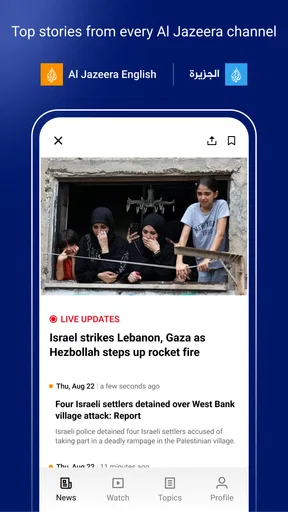
Right off the bat, you'll notice the app's homepage is packed with headlines that scream "read me!" From breaking news to in-depth analysis, the variety is impressive. The navigation is smooth, and everything is just a tap away. No need for a manual here; it’s all pretty self-explanatory.
Features That Stand Out
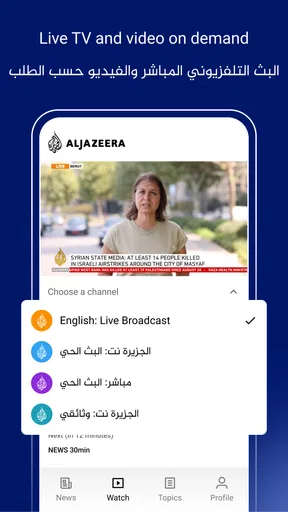
One of the coolest features I’ve found is the live TV streaming. Yes, you heard that right. You can watch Al Jazeera’s live broadcast straight from your phone. It’s perfect for those moments when you’re stuck in traffic or lounging on your couch and need some real-time news action.
For everyday use, I’d reserve live TV for times when watching is practical rather than treating it as background audio everywhere. A live stream can be more useful than a string of headlines when a story is unfolding, because it lets you follow the broadcast as it happens. When you only have a minute, though, scanning article headlines is easier and less demanding. Choosing between those modes based on the moment is one of the simplest ways to keep news from taking over your day.
The app also offers a neat feature called "My Topics," where you can customize what you want to read. Whether it's politics, sports, or technology, you pick your interests, and the app curates content just for you. This personalized approach makes it feel like the app was tailor-made for my tastes.
A useful habit is to treat My Topics as a reading shortcut rather than a complete map of the news. I’d check it when I want to get to a subject quickly, then return to the wider headline view when I have time. That small distinction matters: a personalized selection saves effort, but it can also make a news session feel narrower than intended if it becomes the only section you open.
And let’s not forget the "Trending" section. It’s like a pulse check on what’s happening worldwide. From viral stories to significant events, it's all there, ensuring you never miss a beat.
Trending is most helpful to me as a discovery tool: it can point toward a story I hadn’t planned to read. I would not use it as a measure of what matters most, since popularity and importance are not the same thing. A balanced quick check is to glance at the main headlines, look at Trending for a different angle on what is drawing attention, and then choose one article to read fully rather than hopping endlessly between short updates.
User Experience and Design
Design-wise, the app is a visual treat. The clean layout, combined with high-quality images and videos, makes for an engaging experience. The text is easy on the eyes, and the articles load quickly, which is a huge plus for someone impatient like me.
That visual approach is a strength when I have time to sit and read, but it is not always ideal when I am trying to conserve attention or use a small screen in a hurry. Images and video help give a story context, while a text-first reader may prefer a less visual way to follow the same subject. If your usual news habit is to skim a few lines between tasks, the app’s richer presentation is something to enjoy selectively rather than a reason to keep browsing longer than planned.
I also appreciate the option to switch between dark and light modes. Depending on the time of day, or just my mood, I can toggle between the two. It’s the little things, you know?
For a shared device, a display preference is an easy thing to adjust without changing the news itself. I’d settle on whichever mode is comfortable for the person using the screen, rather than treating it as a household-wide setting everyone must keep. Small choices like this make a late-night read or a bright-room check more pleasant, even though they do not change the app’s coverage or organization.
Keeping You in the Loop
Notifications are another strong suit of this app. You can customize alerts to receive only the news that matters to you. No more endless buzzing for stories you don’t care about. It’s like having a personal news assistant that knows exactly what you want.
For anyone who is unsure how much news they want pushed to them, I’d start with a restrained alert setup and adjust only after seeing how it fits into a normal day. On a personal phone, a timely notification can be convenient; on a shared phone, it can expose one person’s preferences to everyone and create needless interruptions. That trade-off is worth considering before alerts become part of the household’s routine.
There’s also an offline reading feature, which is a lifesaver when you’re in a no-signal zone. Just download the stories beforehand, and you’re good to go. Catching up on news has never been easier.
Offline reading is especially practical if you know you will have a stretch without dependable reception, such as a commute through a dead zone or a wait where connectivity is unreliable. I’d save a few stories while connected and think of them as a short reading queue, not a replacement for live coverage. A downloaded article can keep you occupied, but it cannot provide the same real-time sense of a developing event as the broadcast or a fresh connection.
Who will get the most from it
I’d recommend this app to readers who want Al Jazeera’s reporting, video and live broadcast close at hand, and who like moving between a broad news page and selected subjects. It also suits someone who wants a quick daily scan but occasionally has time to sit with a longer story. Having articles, Trending and live TV together makes it easier to choose a format that matches the time available, rather than relying on only a headline feed or only a television bulletin.
It is less compelling for someone who wants a neutral aggregator that puts many publishers side by side in one stream. This is an app built around Al Jazeera’s own news experience, so readers seeking a deliberate comparison of outlets will need to make that comparison themselves. Likewise, anyone who mainly wants a very quiet, text-only way to check a handful of headlines may find the video and visual presentation more than they need.
How it fits beside other news options
Compared with a general news aggregator, the advantage here is a more direct route into one publisher’s articles and live coverage. An aggregator can be better when the goal is to scan headlines from a range of sources at once; this app is a stronger fit when you specifically want Al Jazeera’s reporting and a broadcast option in the same place. A television news channel, meanwhile, can work well for a hands-free or shared viewing moment, while a phone app is easier to consult privately and briefly.
For me, the practical choice is not to make one format do every job. I’d use the app for its reporting and live stream, keep other trusted sources in my routine when a story needs wider context, and choose an aggregator when comparing coverage is the priority. That is a more useful way to think about it than asking whether one news app can replace every other source.
Final Thoughts
All in all, the Al Jazeera - الجزيرة app is a solid choice for news enthusiasts. It’s packed with features, offers a personalized experience, and keeps you connected to the world. Whether you’re a news junkie or just someone who wants to stay informed, this app delivers on all fronts.
If you haven't tried it yet, I'd say give it a spin. You might just find it becoming your go-to source for news. So, what are you waiting for? Dive into the world of Al Jazeera and keep yourself in the loop!
A sensible place in a household news routine
The best household setup, in my view, is to make clear whether the app is being used as a shared window onto the news or as one person’s personalized reading space. For a common device, keeping alerts limited and using the general headlines as the starting point avoids confusion. For a personal device, My Topics and selected notifications can make the experience feel more individual. Those are habits rather than special household controls, but they help the app fit into a shared routine without promising separation it is not designed to provide.
Al Jazeera Network’s app is free, which makes trying it a low-commitment way to see whether its mix of reporting and live coverage suits your routine. The main question is not whether it has enough ways to deliver news; it is whether you want a dedicated Al Jazeera destination or a broader, multi-publisher view. If you value the former, it earns a place on your phone. If comparing outlets is your main aim, pair it with another source or choose an aggregator for that particular task.
Pros
- Comprehensive global news coverage.
- High-quality video content available.
- User-friendly and intuitive interface.
- Real-time news updates and alerts.
- Multiple language support.
Cons
- Occasional app crashes reported.
- Some articles are region-restricted.
- Limited offline content access.
- Ads can be intrusive at times.
- Navigation can be slightly confusing.
FAQs for Al Jazeera - الجزيرة
What features does the Al Jazeera app offer?
The Al Jazeera app provides a comprehensive range of features, including live news broadcasts, in-depth articles, and video reports. Users can customize their news experience by selecting topics of interest, setting up notifications for breaking news, and accessing exclusive interviews and documentaries. It's designed to keep you informed at all times.
Is the Al Jazeera app available for both Android and iOS devices?
Yes, the Al Jazeera app is available for download on both Android and iOS platforms. It can be easily found in the Google Play Store for Android users and the Apple App Store for iOS users. This ensures that a wide range of users can access the app's features seamlessly across different devices.
Does the Al Jazeera app require a subscription or payment to access content?
The Al Jazeera app is free to download and offers a vast amount of content at no cost. While most features, including live news and articles, are accessible for free, there might be some exclusive content that requires an account login. However, there are no subscription fees for the standard offerings.
How often is the content updated on the Al Jazeera app?
The Al Jazeera app is designed to provide real-time news updates, ensuring that users have access to the latest information as events unfold. News articles, videos, and live broadcasts are updated continuously throughout the day, offering a dynamic and timely news experience for its users.
Can I customize the news feed on the Al Jazeera app?
Yes, the Al Jazeera app allows users to personalize their news feed according to their interests. You can select specific topics, regions, or types of content to follow closely. This customization ensures that you receive news that is most relevant to you, enhancing your overall experience with the app.


